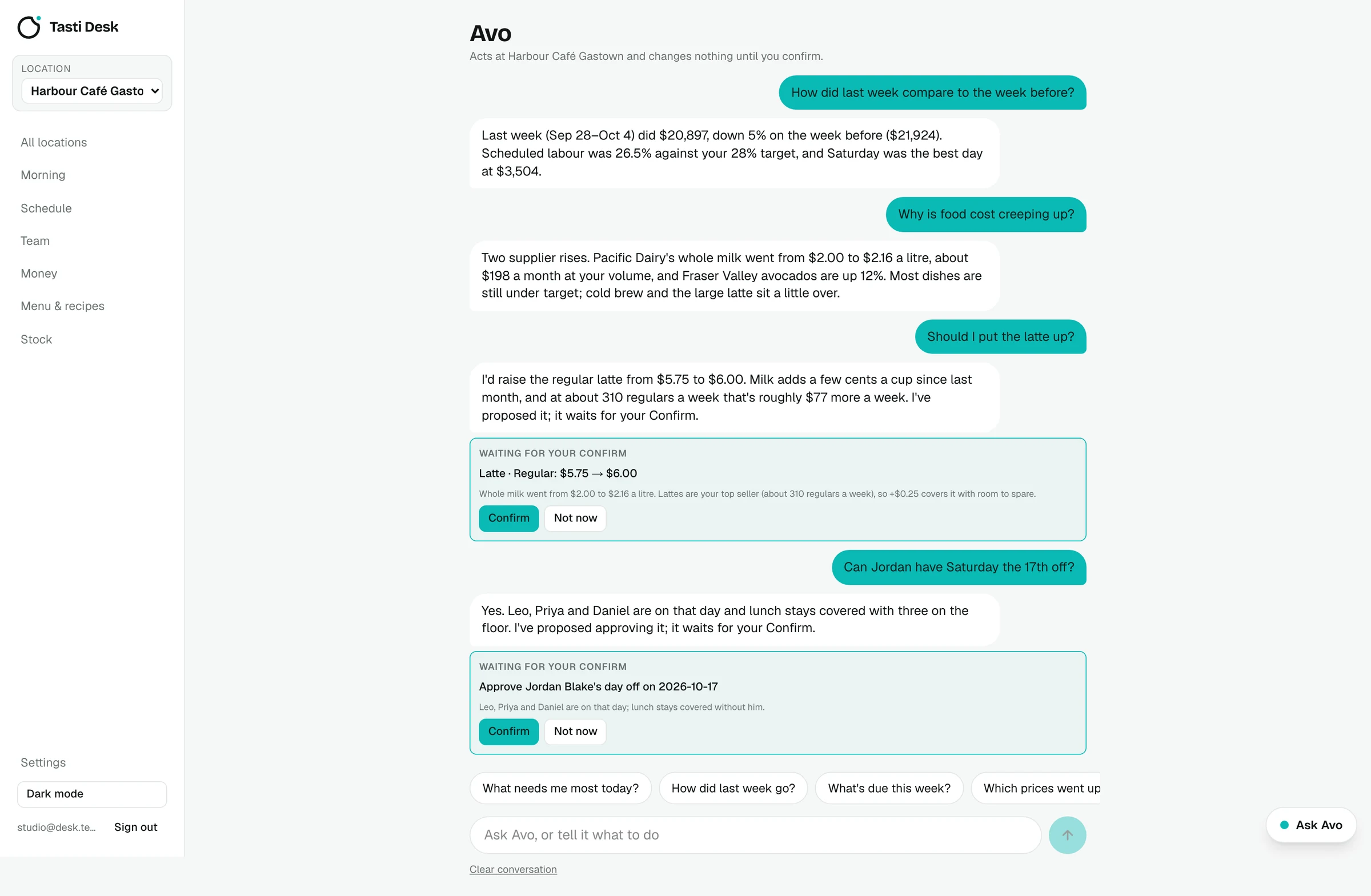

What it does
- Reads your venue. Last 8 weeks of sales, this and next week's schedule and labour cost, open bills, this and last month's food cost %, labour % and profit, menu dishes with cost, stock, suppliers and delivery cutoffs, waste, pending day-off requests, expiring certificates, the Environment Canada forecast and stat holidays in the next 45 days.
- Looks things up. Sales by day, week, month, weekday or hour, item sales, bills and price history, up to two years back.
- Proposes, you confirm. Price change, sold out or back on, approve or decline a day off, mark a bill paid, banner for guests, certificate reminder, note to the team, add or remove a shift, add to a supplier order, log waste, remember a fact.
- Checks its own work. After you confirm, Desk applies the change and reads it back to make sure it landed.
- Learns your preferences. Thumbs up or down with a note, a memory you can see and edit, and it won't re-propose something you dismissed in the last 14 days.
- Across locations. With more than one location, Avo sees a side-by-side summary of all of them.
- In your language. Avo answers in the language you write in.
How it works
- Open Avo and ask, for example: How did last week compare to the week before?
- Avo answers from your own data and shows any change it suggests as a card.
- Tap Confirm to apply it, or dismiss it.
- In Settings, the owner switches off anything Avo shouldn't read: sales, schedule and team, wages, money, menu or stock.
Who it’s for
Owners and managers who want answers about their own numbers without building reports. Staff don't have access to Avo.
In BC and the rest of Canada
- Avo knows your province's stat holidays and uses the Environment and Climate Change Canada forecast for your city.
- Your data stays stored in Canada; Avo's AI provider, Anthropic, doesn't use it to train models.
What it doesn’t do
- Avo never changes anything on its own and never places supplier orders.
- There's a monthly AI allowance per venue, shown as a percentage. Near the end Avo gives shorter answers; at 100% chat pauses until the 1st (bill reading keeps working).
- Avo's answers are suggestions, not legal, tax or payroll advice.
Price
Avo, the AI assistant is part of the one Tasti Desk plan: $149 CAD per location a month, or $1,490 a year, with every feature included. 30 days free, no card. Square connects in a few minutes and brings in real sales, menu and team. On another POS, the founder builds the connection on request; schedule, team, bills, menu and stock work either way. See pricing.
Questions
Can Avo change things without asking?
No. Every change is a proposal; nothing happens until you tap Confirm.
Which AI does Avo use?
Anthropic's Claude models. Only the data needed for the answer is sent, and Anthropic does not use it to train its models.
Can I limit what Avo sees?
Yes. The owner can switch off sales, schedule and team, wages, money, menu or stock in Settings. Managers' own access limits apply too.
Can staff use Avo?
No. Avo is for owners and managers.
Is there a limit on questions?
There's a monthly AI allowance per venue, shown as a percentage in Settings. It covers normal daily use.