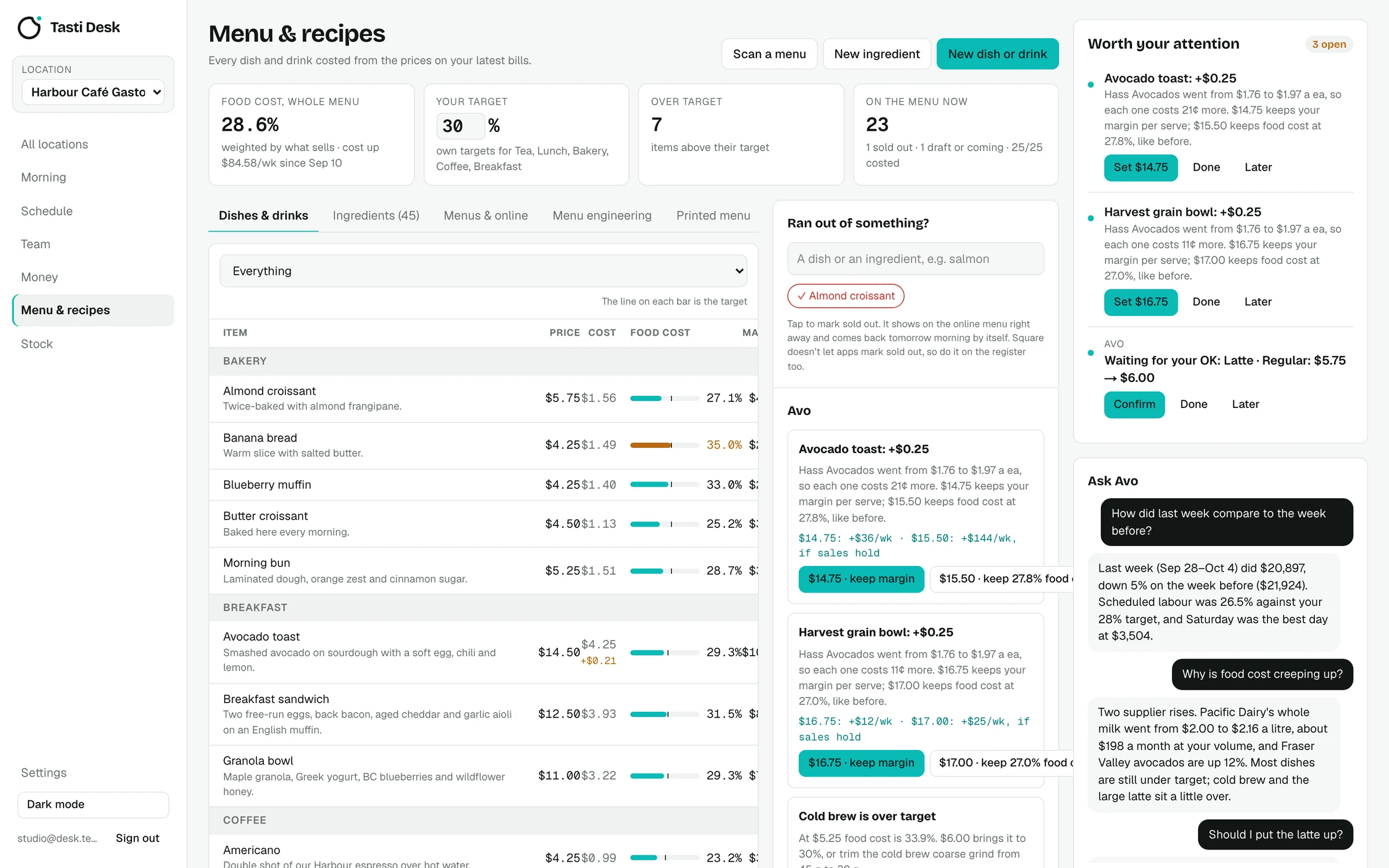

What it does
- Ingredients from bills. Food, beverage, alcohol and packaging lines with a kg, L or each unit become ingredients automatically, priced from the latest real bill (with a manual price if there's no bill yet).
- Recipes per size. One recipe per variation (for example Latte, large): each ingredient and quantity per serve, plus a pantry amount for salt, oil and garnish.
- Avo drafts recipes. Avo can draft a recipe from the dish name and description using only your own ingredients; you edit it before saving.
- Target and suggested price. A target food cost for the menu and optional targets per category. The suggested price is cost divided by target, rounded up to the next $0.25.
- What's drifting. Dishes over target by more than a point, and dishes whose cost went up 10 cents or more per serve, come with Avo's options: keep the margin, keep the food cost %, or trim the biggest ingredient.
- Menu engineering. Stars, Plowhorses, Puzzles and Dogs from your Square item sales and margins, so you know what to promote, reprice or drop.
- Shared recipes. Recipes are shared across your locations and costed at each location's own prices.
- Dish lifecycle. Draft, scheduled from a date, live, or off with its recipe and history kept. Each dish keeps a change history.
How it works
- Forward a few weeks of supplier bills so ingredients and prices fill in.
- Open a dish (from Square or added in Desk) and add its ingredients, or let Avo draft them.
- Set your target food cost and check the dishes over it.
- Confirm or dismiss Avo's price suggestions as supplier prices change.
Who it’s for
Owners and chefs who set menu prices by feel or from an old spreadsheet and want food cost that moves with real supplier prices.
In BC and the rest of Canada
- Prices in CAD, before tax, from your own suppliers' bills.
What it doesn’t do
- No sub-recipes or batch recipes: recipe lines point to ingredients.
- Menu engineering and usage need sales by item, which come from Square today.
- Price changes are written to Square only if the owner turns on menu changes, and only after you confirm.
Price
Recipes and food cost is part of the one Tasti Desk plan: $149 CAD per location a month, or $1,490 a year, with every feature included. 30 days free, no card. Square connects in a few minutes and brings in real sales, menu and team. On another POS, the founder builds the connection on request; schedule, team, bills, menu and stock work either way. See pricing.
Questions
How does Tasti Desk calculate food cost?
Cost per serve is the sum of each ingredient's quantity times its latest price from your bills, plus the pantry amount. Food cost % is that cost divided by the menu price.
What is the suggested price?
Cost per serve divided by your target food cost, rounded up to the next 25 cents.
Do I have to type in ingredient prices?
No. Ingredients and their prices come from the supplier bills you forward. You can set a manual price for anything without a bill.
Does it support sub-recipes?
Not today. Each recipe line is an ingredient; use the pantry amount for small shared items.