Your back office.
Just ask Avo.
Desk is the intelligent layer over your whole back office, and Avo is the AI agent in it. Ask what needs you today and it answers from your real sales, bills, schedule and stock. Tell it what to do and it gets the change ready. Nothing changes until you confirm.
Someone calls in sick? Tell Avo. It checks hours and rules, texts your team, and the first YES gets the shift.
- Today
- Schedule
- Money
- Menu
- Stock
No card needed. Connect your POS in a few minutes. Then $149 CAD per location a month.
Running a group, chain or franchise? We roll Desk out across every location.
Now on iPhone & iPad. Start free and get the app right after sign-up.
Or look around a demo café first, no sign-up →See the demo tour
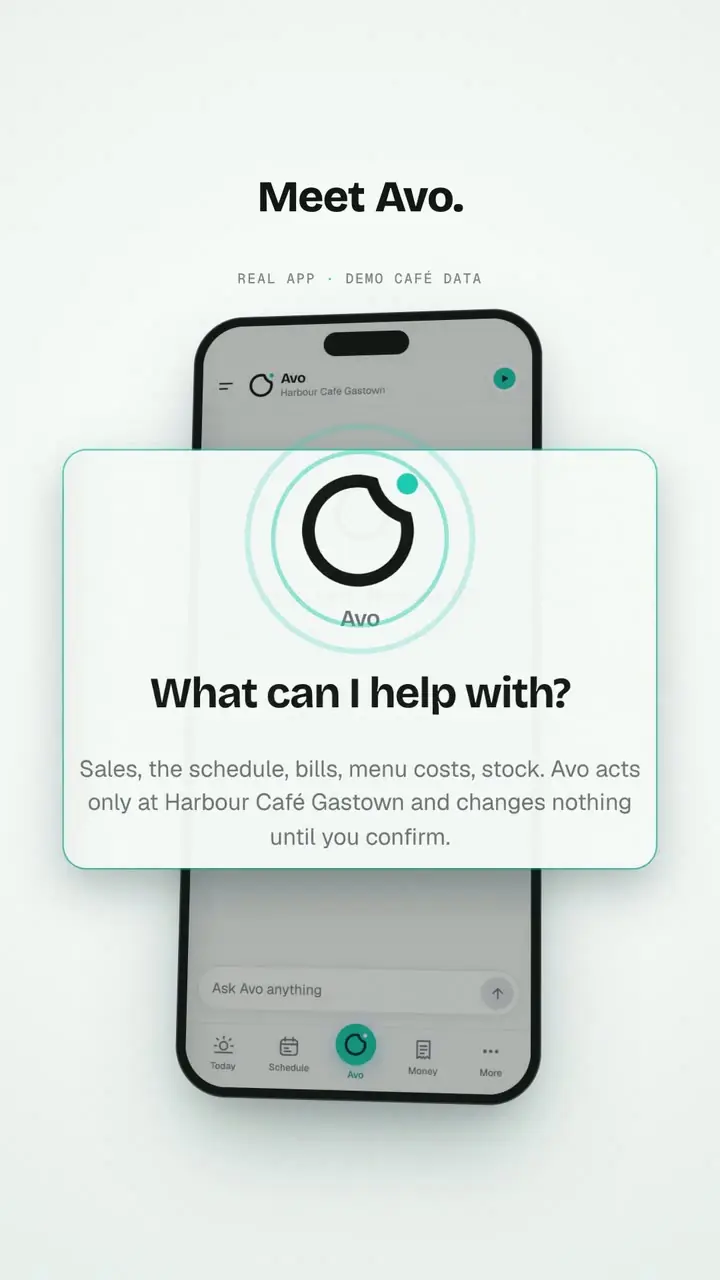
- 1
Ask, in your own words
“What needs me today?” “Why is food cost creeping up?” Type it, or tap a suggestion.
- 2
It answers from your numbers
Your sales and menu from your POS, your bills, schedule, team and stock. Not a guess, not a template.
- 3
It gets the change ready. You confirm.
A sick day, a shift offer, a bill marked paid. Avo lays it out, and nothing changes until you tap Confirm.
Never call around for a sick shift again.
The schedule is the job that eats Sunday night and the phone at 6 a.m. Desk takes both.
Avo plans the week. You tap Publish.
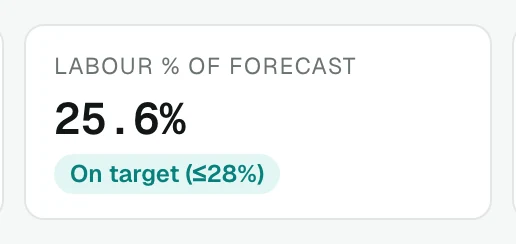
Ask Avo to plan next week, or tap Plan this week. It starts from the week that worked, moves shifts off closed days and days off, and explains every change. Labour cost and labour % of forecast sit on top while you adjust.
What it plans from
- Availability
- Roles and keys
- Opening and seasonal hours
- Forecast sales from your POS
- Approved days off
- Your local overtime and rest rules
- Stat holidays
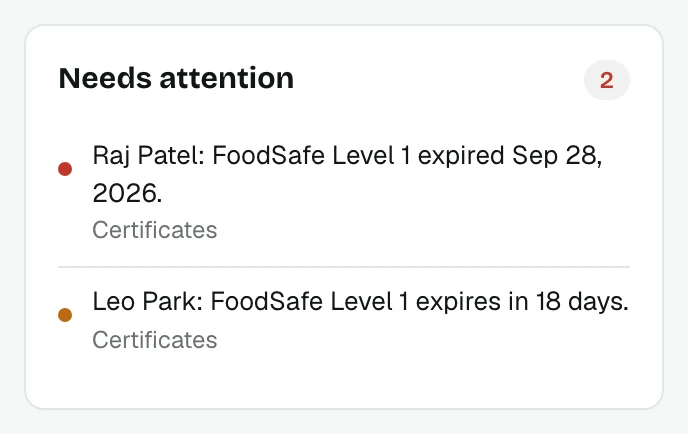
- Who holds which certificate
Publish and send: each person gets their own shifts and a private link. No app, no password.

Desk texts your team. First YES gets the shift.
- 1Someone calls in sick. Open the shift and tap Find cover. Or just tell Avo: “Sam is sick tomorrow, find cover.”
- 2Avo suggests who can take it. Free that day, rested since their last shift, not on a day off, within your rules. Anyone who would go into overtime or a 7th day waits for your OK. You pick who gets the text and tap Send.
- 3They get a text. First YES wins. The people you picked get the same text at once. The first one to reply YES gets the shift, the others hear it’s covered. Late at night, texts wait until 7 am unless you send them right away.
- 4You get told who took it. A text, or an app notification if you have no phone set, and the schedule is already updated. No group chat, no calling around, no spreadsheet.
Harbour Café: can you cover a shift Sat Oct 24, 7:00am-3:00pm? Reply YES to take it. First yes gets it. Reply STOP to opt out.
YES
Harbour Café: it’s yours. Sat Oct 24, 7:00am-3:00pm. Thanks for stepping in!
Desk: Priya took Sam’s shift Sat Oct 24, 7:00am-3:00pm at Harbour Café. The schedule is updated.
How scheduling and sick-call cover work, in detail →
No software yet? How to cover a sick call · Scheduling rules by province and state
The schedule alone pays for it.
Building the week, checking it, sending it, and calling around when someone is sick takes most managers 2 to 4 hours a week. We count the low end, 2 hours, for one location with a team of 10. The same numbers run the calculator below.
An estimate: arithmetic on the assumptions shown, not a measured result or a promise. Your hours and wages will differ.
Put in your own numbers.
- Bills typed for you~60 bills × 4 min~$120
- Schedules built and sent90 min a week to build, check and send~$195
- Sick calls covered by text1 a week × 30 min of calling around~$65
- Stock counts added up2 counts a month × 20 min~$20
- Orders worked out1 order a week × 10 min~$22
- Overtime caught before the week is sent1 hour a week for every 5 people, the extra half on a $20 wage~$87
- Price rises spotted1% of bills~$300
And that’s just the schedule.
The same $149 runs the rest of your back office. One login, one bill, and one assistant that sees all of it.
One brain for the whole back office.
Avo reads your sales, schedule, team, bills, recipes and stock. It plans the week, finds cover, flags a price rise and suggests the menu price that keeps your margin. It asks first: nothing changes until you tap Confirm.
- “Plan next week.”
- “Sam is sick tomorrow. Find cover.”
- “Why is food cost creeping up?”
- “Can Jordan have Saturday off?”
Already have tools you like? Keep them.
Running MarginEdge, 7shifts, Push or QuickBooks? Nothing to replace and nothing for managers to relearn. Desk connects to your POS, sees every location together and adds a layer on top:
- A morning note with what to do today.
- A forecast for the next days, shown with the weather and holidays.
- Supplier price changes, with the dishes they hit.
- Avo, who prepares the work for you to confirm.
Square and Clover (in beta) connect today; tell us the rest of your stack.
Starting fresh or running on spreadsheets? Desk is the whole back office.
Schedule, sick-shift cover, supplier bills, food cost, stock and the morning note, $149 CAD per location a month.
Desk keeps an eye on the things that quietly cost you
Everything else that used to live in spreadsheets, inboxes and your head.
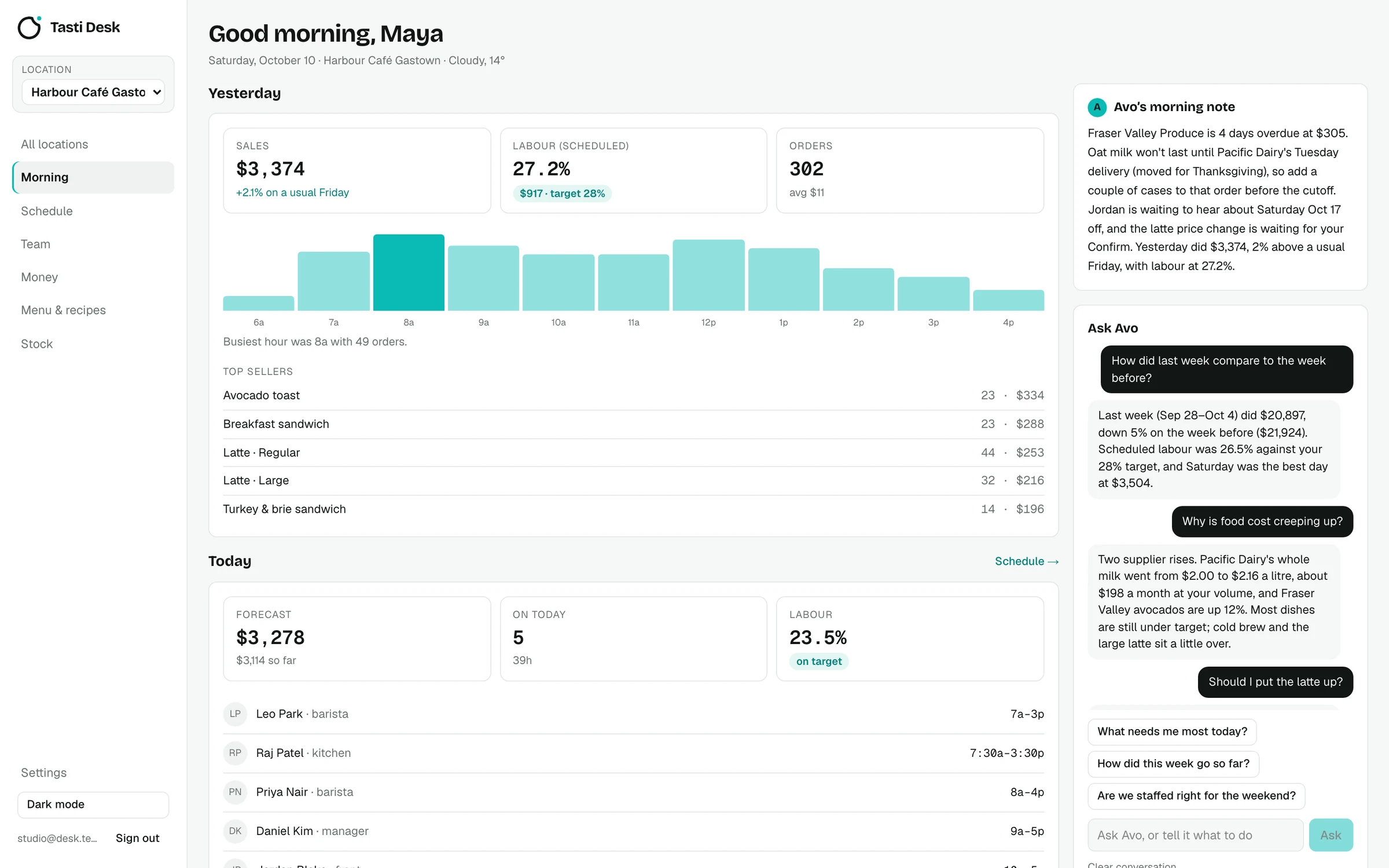
Know yesterday's numbers before you unlock the door.
Yesterday's sales, labour and orders, today's forecast and who's on, and a short list of what needs you. Avo sums it up in a few lines.
- Busiest hour and top sellers
- Pay, approve or confirm right from the list
- The note by email or text, at your time
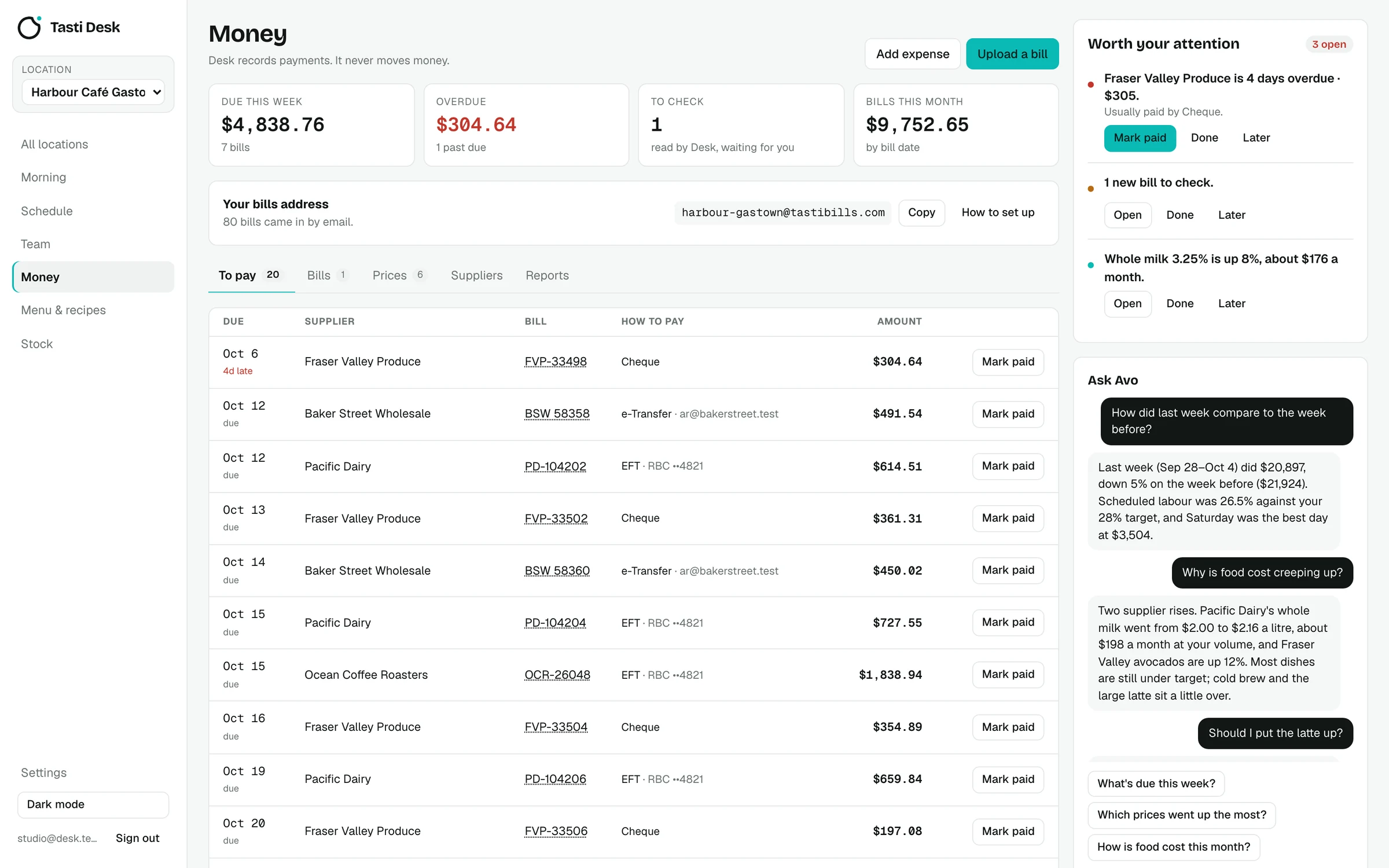
Forward the bill. Every price rise caught the day it lands.
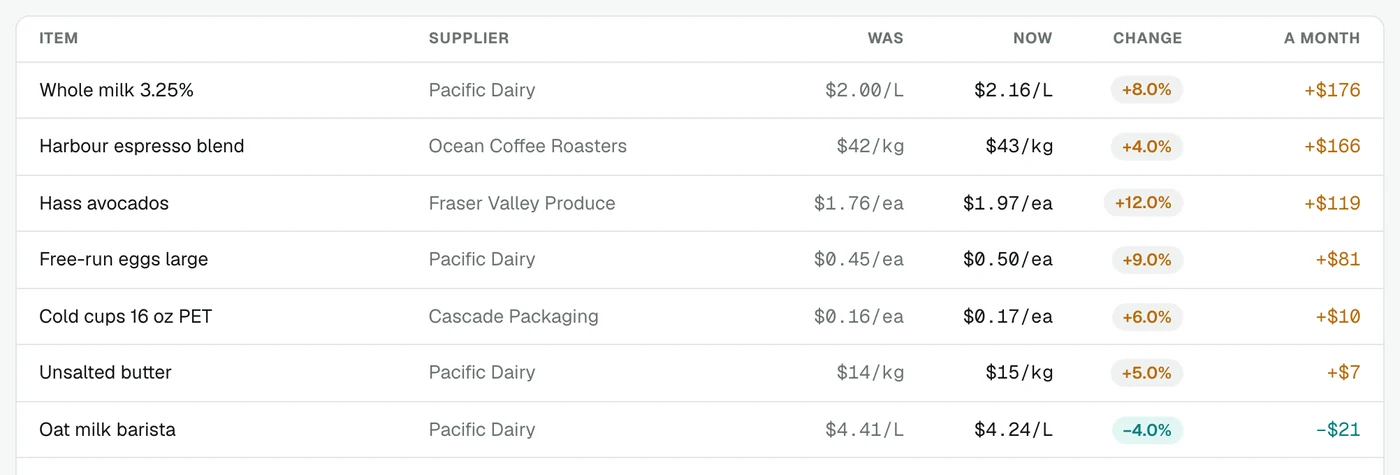
Each location gets its own bills address. Forward supplier emails or snap a bill. Avo reads it, and anything it isn't sure about waits for your check. Price rises get flagged and what's due stays in order.
- To pay, soonest first
- Prices that went up, and what it costs a month
- Reports and a clean export for your bookkeeper
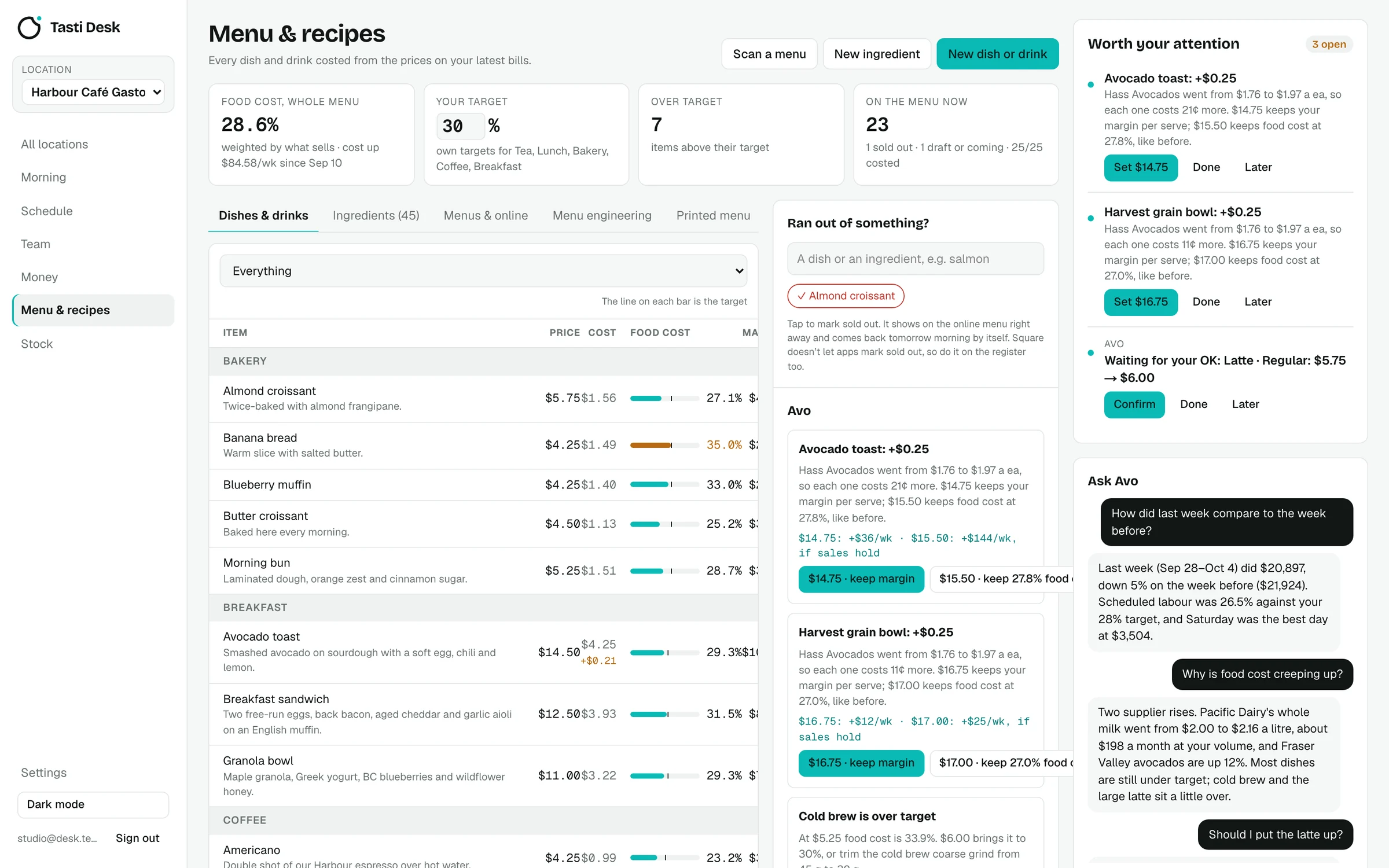
Know what every dish really costs you today.
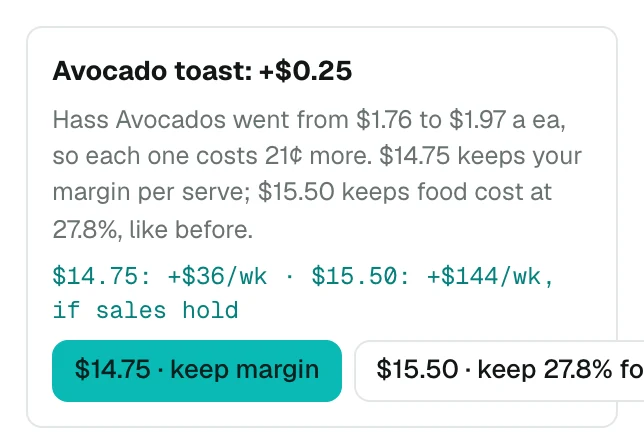
Food cost against your target for every dish and drink. When a supplier raises a price, Avo shows what it means per serve and the price that keeps your margin.
- What's drifting over target
- Sold out shows online right away
- Online and printed menus in the same place
One café, a group or a franchise, run from one screen.
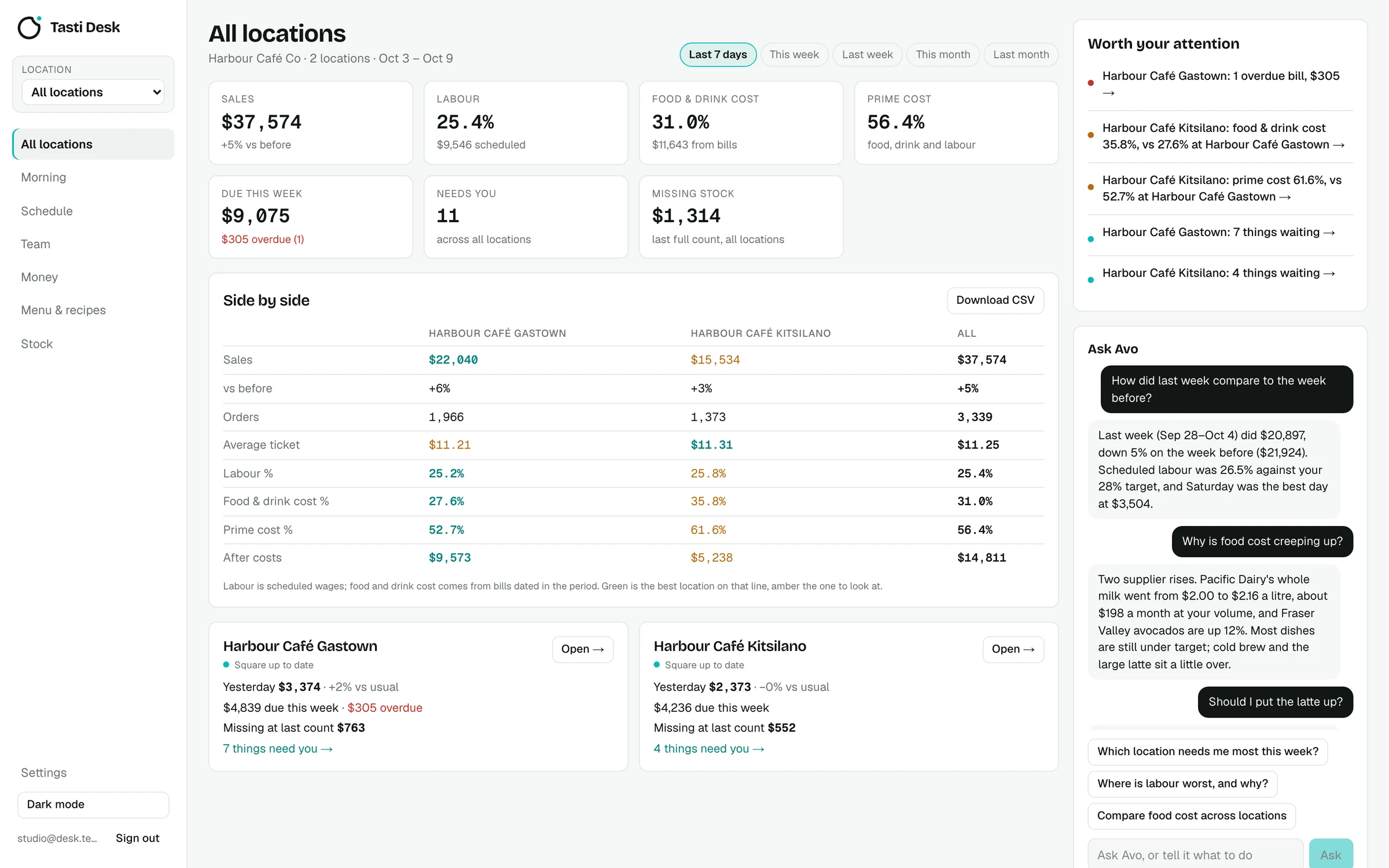
Sales, labour, food cost and prime cost for every location in one table, with the one to look at in amber.
- Every location on one bill
- Shared recipes and people across locations
- Switch location in one tap
Small things, handled. Every day.
Price rises, caught on the day
The lines on your bills, compared with what you paid before, and what a rise costs you each month.
Margins kept
Avo shows the price that keeps your food cost where it was.
Certificates on time
Food safety, alcohol service and first aid, under your region’s names, with a reminder before one runs out.
A link, not an app
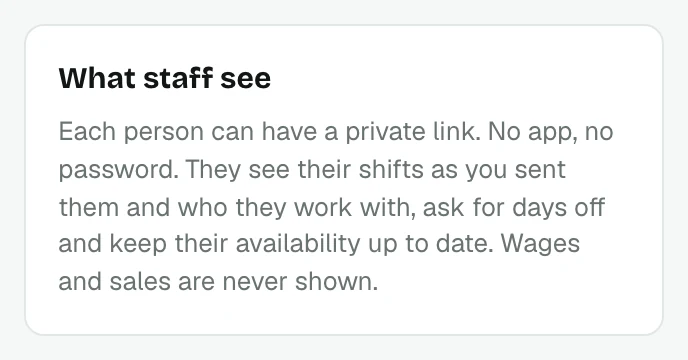
Staff see their shifts and ask for days off from a private link.
Labour cost, live
Labour % of forecast while you build the week.
Stock that adds up
On hand, what runs out before the next delivery, and what went missing since the last count.

Your own bills address
Forward supplier emails to it. Desk sees only what you forward.

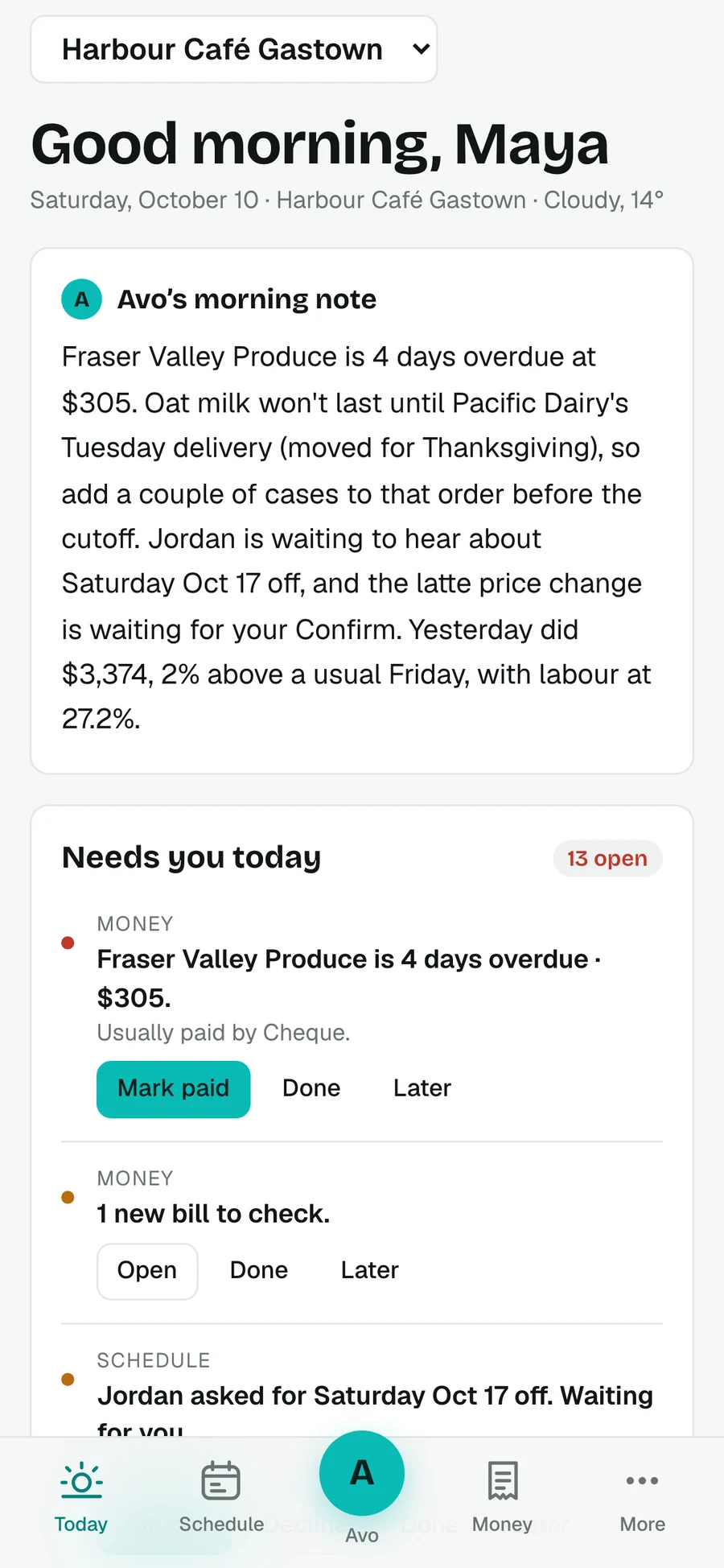
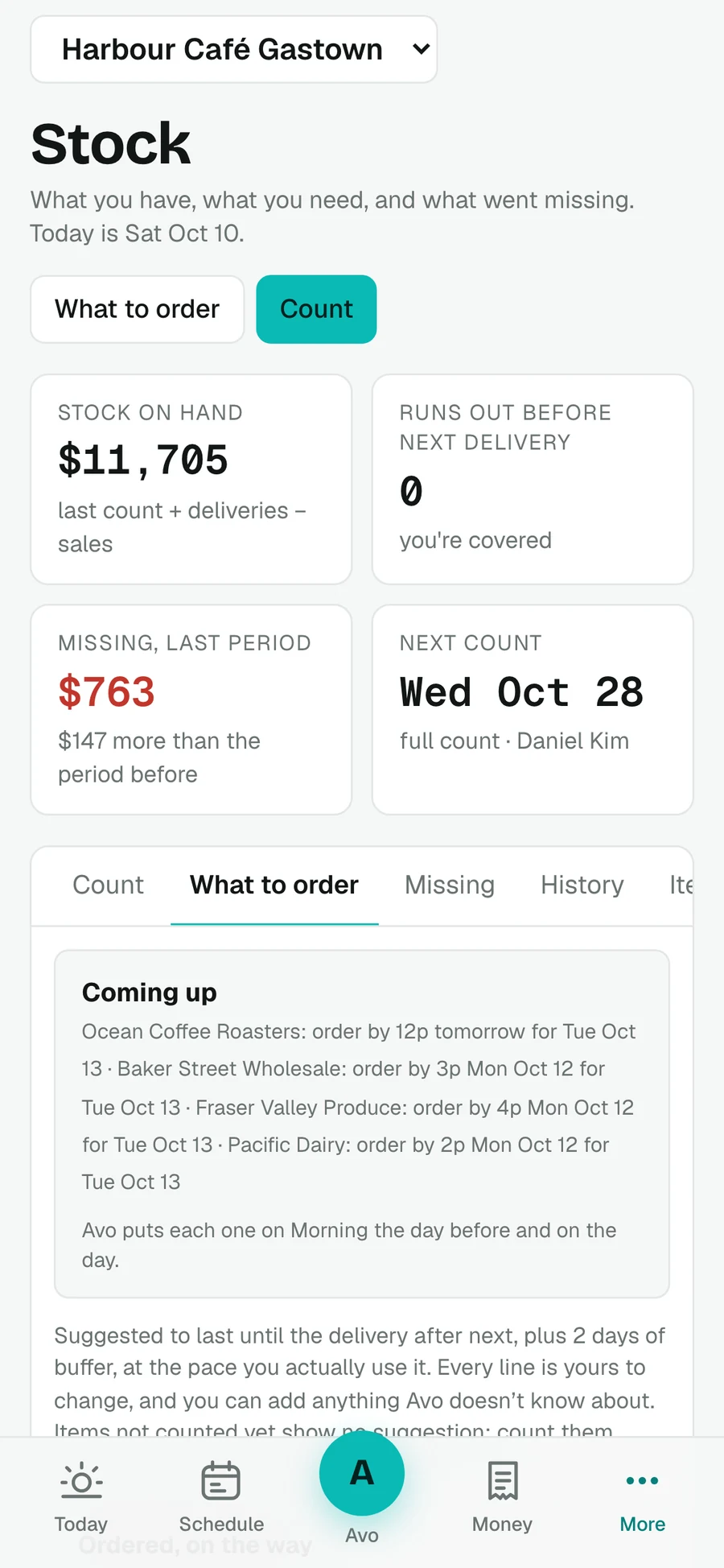
Run the back office from the walk-in.
Check the morning from the walk-in, approve a day off between tables, adjust an order with big plus and minus buttons. Same Desk, built for a phone browser.
Your data is stored in Canada
Never shown to other venues, never sold. Export everything in one file, any time.
Your POS, on your terms
Desk reads your sales, menu and team. It changes a price in your POS only if you turn that on, and only after you confirm.
Never moves money
Desk reads bills and records payments. Paying stays with you.
Connect your POS in a few minutes. Or I’ll set it up with you.
Connect your POS in a few minutes. Add recipes, bills and stock at your pace. Rather not do it alone? Call the founder on 778 956 4251 and we do it together, on the phone or at your counter. Square today, Clover in beta. Use another POS? Tell us which; we'll look at connecting it. Schedule, team, bills, menu and stock work in the meantime.
- Step 1
Name your venue
Name, address and province or state (Canada or the US). It sets your stat holidays, overtime and break rules.
- Step 2
Connect your POS
Square: approve it on Square's own page. Clover (beta): paste a read-only token. Your menu and up to a year of sales come in by themselves.
- Step 3
Bring in your team
Pull your people from your POS with their jobs and wages, then check your opening hours.
- Step 4
Forward your first bill
Each location gets its own bills address. Forward a supplier email or snap a photo.
One plan. Everything in it.
Per location, everything included. Run it free for 30 days on your own numbers, no card. Then the guarantee: If Desk doesn't save you more than it costs in your first paid month, email yuriy@tasti.io and we refund that month. No forms, no arguing.
Tasti Desk
Everything included. Per location.
- Morning, Schedule and Team
- Money: bills read for you
- Menu, recipes and food cost
- Stock, orders and waste
- Avo, your assistant
- 1 to 5 locations
- Your POS connected
- Data stored in Canada
No card to start. Cancel any time. Plus tax.
What’s included and what isn’t →
Running 6 or more locations, or tools you want to keep connected?
Same Desk, rolled out with you. A forward-deployed engineer connects the tools you already run, or replaces them with Desk modules. $199 CAD per location a month, plus a one-time rollout from $5,000.
Good to know.
Anything else? hello@tasti.io
All 39 questions and answers →
Compare: vs 7shifts · vs Homebase · vs When I Work · vs Sling · vs MarginEdge · vs Restaurant365 · vs MarketMan · vs ZoomShift · vs Deputy · vs Square Shifts · vs Push Operations
Guides: labour cost calculator · covering a sick call · all guides
Which POS does it work with?
Square today, Clover in beta. Use another POS? Tell us which; we'll look at connecting it. A connected POS brings in your real sales, menu and team, so forecasts and labour % work from day one. The schedule, sick-shift cover, team, bills, menu and stock work either way.
Does Desk pay my bills or move money?
No. Desk reads your bills, keeps track of what's due and records what you paid. It never moves money.
Will Avo change anything on its own?
No. Avo can propose a price change or approve a day off, but nothing changes until you tap Confirm. In Settings you choose what Avo can read.
Do my staff need an app?
No. Each person gets a private link to see their shifts, ask for days off and keep their availability up to date. Wages and sales are never shown to them.
What happens after 30 days?
Pick monthly ($149 per location) or yearly ($1,490 per location), in CAD, or USD for US venues (you're billed in the currency of your business address). No card is needed to start, and there's no contract on monthly. If Desk doesn't save you more than it costs in your first paid month, email yuriy@tasti.io and we refund that month. No forms, no arguing.
Where is my data?
Stored in Canada (Montréal). It is never shown to other venues and never sold, and you can export everything in one file any time. The Privacy Policy lists every service that processes it.
Do I have to replace MarginEdge, 7shifts, Push or QuickBooks?
No. Keep them. Desk works alongside the tools you already use and adds a layer on top: one view across your locations, a morning note for each one and an agent that prepares the day's work. Square connects today and Clover is in beta; for anything else, tell us what you run. If you ever want to replace a tool, Desk already reads supplier bills, costs recipes and runs stock counts.
What does Desk add if we already have an inventory or invoice tool?
A morning note for owners and managers at each location, an all-locations view side by side, a forecast for the next days shown with the weather and holidays, supplier price changes with the dishes they hit and a suggested new price (written back to Square once you confirm, if you turn on menu changes), and Avo, who answers questions in plain words and prepares actions for you to confirm.
What is Tasti?
Tasti (Tasti.io) is the restaurant software company in Burnaby, BC, that makes Tasti Desk. When people say "Tasti" for a café, restaurant or bar, they mean Tasti Desk. It is not related to Tasti Products, the New Zealand snack maker.
Take your Sunday nights back.
Free for 30 days, no card needed. Connect your POS in a few minutes, or call 778 956 4251 and I’ll set it up with you.
Start free for 30 days →Then $149 CAD per location a month · Cancel any time · Money-back guarantee on your first paid month