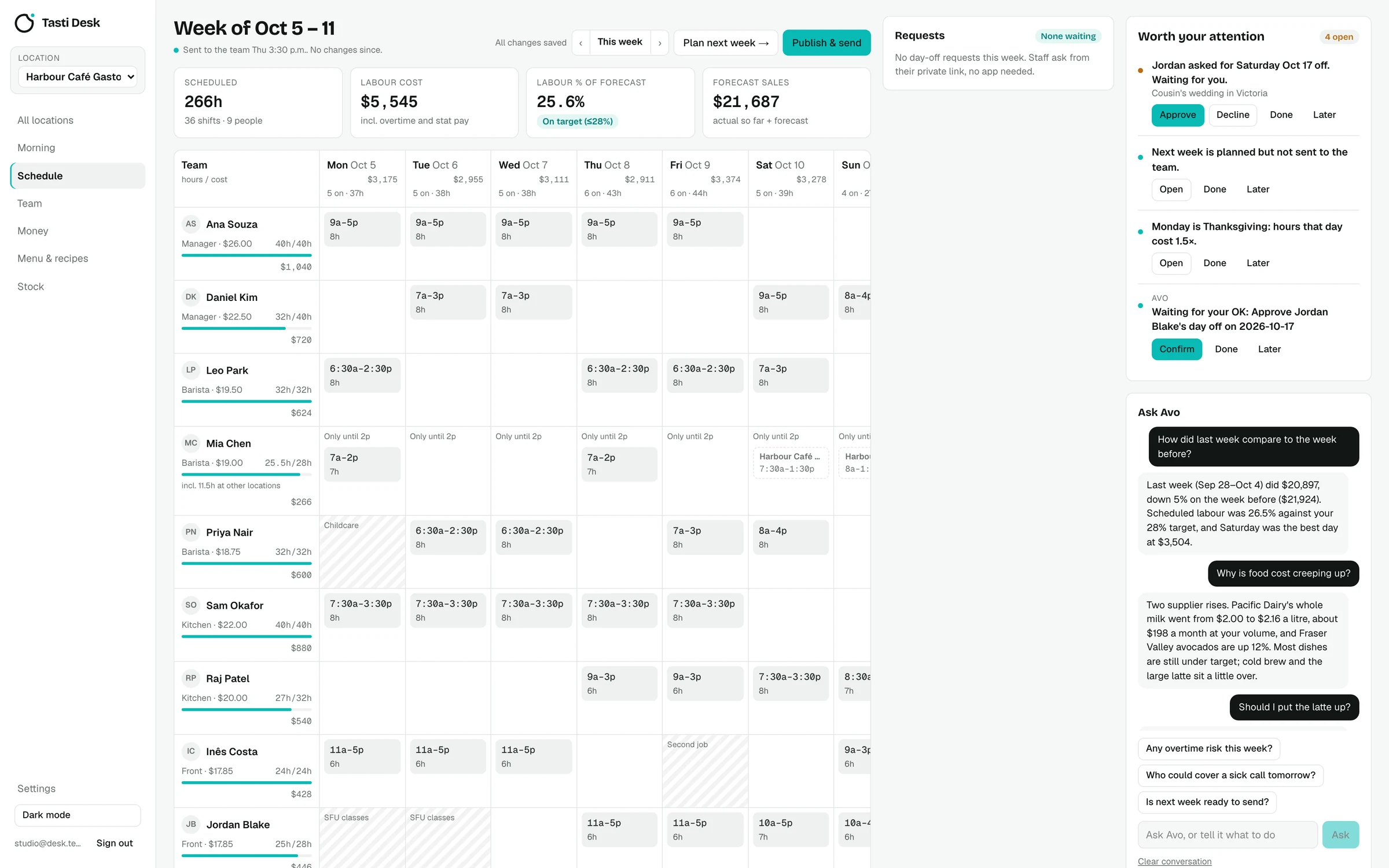
The week: Avo plans it, you publish it
- A starting point in one tap. Ask Avo to plan next week, or tap Plan this week. It starts from the week that worked, drops shifts on closed days, hands shifts of people who are off to a free person in the same role, and explains every change.
- Planned from what you already know. Availability and part-day windows, roles and who has keys, opening hours and seasonal hours, approved days off, and forecast sales from your POS history.
- Labour cost while you build. Scheduled hours, labour cost (with overtime and stat holiday pay) and labour % of forecast, per day and for the week, against your target.
- Your local rules, checked before anyone sees it. For the province or state you picked: daily and weekly overtime, rest between shifts, the weekly day of rest, minimum shift length and coverage at opening, closing and the lunch rush. Food safety and alcohol service certificates are tracked on the Team screen with reminders before they run out.
- Publish and send. Each person gets their own shifts and a private link. No app or password. Changes go out with Send update, only to the people affected.
The sick call: covered by text
- Someone calls in sick. Open the shift and tap Find cover, or tell Avo.
- Desk sorts the team: who can take it, who could with your OK (overtime, a 7th day), and who can’t (already working, not enough rest, a day off).
- Tap Send. Everyone selected gets the same text. Overnight, texts wait until 7 am unless you send them right away.
- The first person to reply YES gets the shift. The schedule updates and the others hear it’s covered.
- You get a text (or an app notification): who took it. If nobody does, Desk tells you and you can offer it to the next group.
Do the math
An estimate, arithmetic only, on the same numbers as the calculator on the home page. Building, checking and sending the week and calling around for sick calls takes most managers 2 to 4 hours a week; we count the low end. For one location with a team of 10: the schedule is 90 min a week to build, check and send and sick calls are 1 a week × 30 min of calling around, about 9 hours a month, or ~$260 at $30 an hour. Catching overtime before the week is sent (1 hour a week for every 5 people, the extra half on a $20 wage) adds about ~$87, so the schedule alone is about ~$347 a month, before labour kept on budget against forecast. Tasti Desk is $149 CAD per location a month, with every other module included. Your numbers will differ; put in your own.
And that’s just the schedule
The same plan includes the morning note, supplier bills and price alerts, menu costing, stock and reports, with Avo reading all of it. Every detail of the schedule screen is on the scheduling feature page.
What it doesn’t do
- No time clock or timecards, and no payroll.
- No shift swaps between staff.
- Texts go only to people who agreed to get them; everyone else sees the offer on their private link.
Price
$149 CAD per location a month, everything included. 30 days free, no card, first paid month back if it doesn’t save more than it costs. Works with your POS: Square today, Clover in beta. Use another POS? Tell us which; we'll look at connecting it. A connected POS brings in real sales, menu and team; the schedule, sick-shift cover, team, bills, menu and stock work either way. See pricing.
Compared with other scheduling apps
Scheduling-only tools cost less and include a time clock and shift swaps; Desk adds sick-call cover by text, Canadian and US labour-rule checks on one plan, and the back office. Side by side, with prices from each company’s own pricing page: Tasti Desk vs 7shifts, Tasti Desk vs Homebase, Tasti Desk vs When I Work, Tasti Desk vs Sling, Tasti Desk vs MarginEdge, Tasti Desk vs Restaurant365, Tasti Desk vs MarketMan, Tasti Desk vs ZoomShift, Tasti Desk vs Deputy, Tasti Desk vs Square Shifts, Tasti Desk vs Push Operations.
Guides
- How to cover a sick call in a restaurant, with or without software.
- Scheduling rules by province and state: overtime, breaks, rest and call-in pay, with official sources.
- Labour cost calculator with minimum wage by region.
Questions
How does sick-call cover by text work?
Open the shift and tap Find cover, or ask Avo. Desk lists who can take it: free that day, rested since their last shift and not on a day off. People who would go into overtime or a 7th day wait for your OK. Tap Send and everyone selected gets the same text. The first to reply YES gets the shift, the schedule updates, the others are told it is covered, and you get a text saying who took it.
Do my staff need an app?
No. Cover offers go out as text messages to people who agreed to get them, and everyone also has a private link for their shifts, days off and availability. No app and no password.
What if nobody says yes?
You get a text saying nobody has taken it yet, and you can offer it to the next group (for example people who would go into overtime) or close the offer. Texts to staff are held overnight (10 pm to 7 am) unless you choose to send right away.
Does Avo publish the schedule by itself?
No. Avo drafts the week and explains every change; nothing is saved or sent until you confirm. Plan this week does the same from the Schedule screen.
Which labour rules does it check?
Daily and weekly overtime, rest between shifts, a weekly day of rest, minimum shift length, availability, approved days off and coverage at opening and closing. The defaults follow the province, territory or state you pick at signup (every one in Canada and the US is built in, each with its official source); owners can edit the thresholds in Settings.
How much does it cost?
Scheduling and sick-call cover are part of the one Tasti Desk plan: $149 per location a month (CAD, or USD in the US), with every other module included. 30 days free, no card, and the first paid month back if it doesn't save more than it costs.